
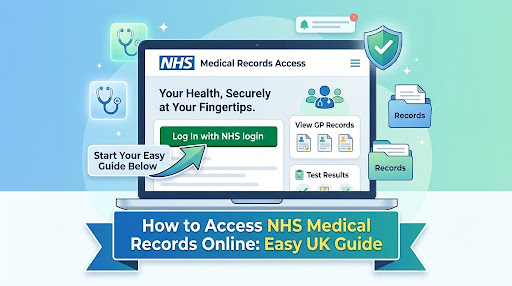
Your medical records contain important information about your health, including previous diagnoses, medications, allergies, test results, vaccinations and appointments. Having access to this information can help you understand your health better, prepare for GP appointments and make more informed decisions about your treatment.
Fortunately, accessing NHS medical records online has become easier through digital NHS services. In England, the NHS App allows eligible patients to view information from their GP health records, including appointment notes, medicines and certain test results.
However, many people are unsure how to access their records, whether they can see their complete medical history, or how to obtain hospital reports and older documents that are not available through the app.
The good news is that you have a legal right to access your personal health information, subject to certain safeguards and exemptions.
This guide explains how to access NHS medical records online, how to use the NHS App, what information you can view, how to request older records and what to do if something is missing.
Whether you want to check a recent blood test, review your medication history or obtain hospital documents, understanding the available options can make the process much easier.
What Are NHS Medical Records?
NHS medical records are documents and electronic information created and maintained by healthcare professionals during your treatment and care.
They provide a history of your health and help doctors, nurses and other healthcare professionals make informed clinical decisions.
Your records may be held by several healthcare organisations, depending on where you have received treatment.
For example:
- Your GP surgery holds your general practice records.
- NHS hospitals hold records relating to hospital appointments and treatment.
- NHS laboratories hold information about tests they perform.
- Community healthcare services may hold information about your care.
- Mental health services may maintain specialist treatment records.
- Dental practices hold information about your dental treatment.
Your medical records may include:
- Previous and current medical conditions.
- Diagnoses and clinical assessments.
- Prescription and medication history.
- Allergies and adverse reactions.
- Blood test and other investigation results.
- Vaccination records.
- GP consultation notes.
- Hospital appointment information.
- Referral letters and discharge summaries.
- X-ray, MRI and other imaging reports.
- Treatment plans and follow-up recommendations.
Not all these documents will automatically appear in one online account.
The information available depends on the healthcare organisation, its record system and the level of online access provided.
Can You Access Your NHS Medical Records Online?
Yes. You can access certain NHS medical records online, and you can request copies of additional records directly from the organisation that holds them.
In England, the NHS App is one of the easiest ways to access your GP health record.
It allows eligible users to view information such as:
- Medicines and prescriptions.
- Test results shared with their GP surgery.
- Health conditions and allergies, where available.
- GP appointment information.
- Consultation notes and other updates.
- Documents uploaded to their GP record.
All GP surgeries in England are required to provide online access to new information added to patients’ GP health records, unless an applicable exception or safeguarding concern applies.
However, this does not mean every patient automatically receives access to their complete historical medical record.
Older information may require a separate request to your GP practice.
Some hospital information may also be available through the NHS App, but not every hospital record or investigation is included.
For more information, see the official NHS England guidance on GP health records in the NHS App. NHS England Digital+1
How to Access NHS Medical Records Online Using the NHS App
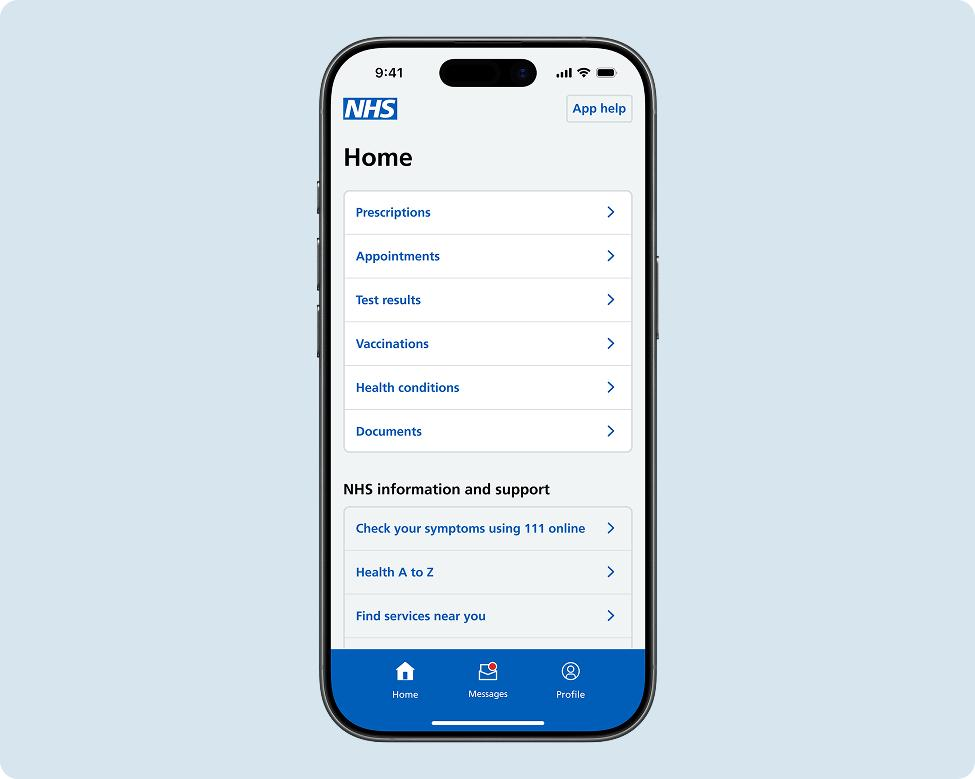
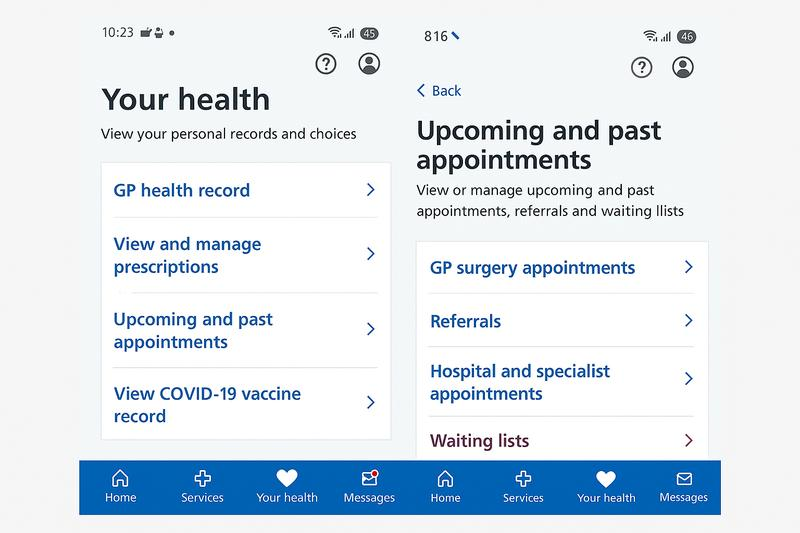
The NHS App is a convenient starting point if you are registered with a GP surgery in England.
You can use it through a smartphone or tablet, or access NHS services by logging into your NHS account through the NHS website.
Follow these steps.
Step 1: Download the NHS App
Visit the official NHS website:
You can download the app through the Apple App Store or Google Play Store.
Alternatively, you can access your NHS account through the NHS website.
Always download the official application rather than using an unfamiliar third-party app.
Step 2: Create or Sign In to Your NHS Account
Open the app and choose the option to sign in or create an account.
You will generally need:
- An email address.
- A mobile phone number.
- Your personal details.
- Information needed to verify your identity.
If you already have an NHS account, use your existing login details.
Step 3: Verify Your Identity
To access personal health information, you must prove who you are.
The NHS may ask you to:
- Upload a photograph of an accepted identity document.
- Complete a facial identity check.
- Follow alternative identity verification instructions if you do not have photo ID.
You may also be able to verify your identity using details from your GP surgery’s existing online services.
The verification process helps prevent unauthorised people from accessing confidential health information.
Read the official NHS guide to getting full access. NHS
Step 4: Open Your Health Record
Once you have signed in and obtained the appropriate access, look for the health record features.
Depending on the available services, you may find sections covering:
- Appointments.
- Prescriptions.
- Test results.
- Health conditions.
- Documents.
- Allergies and adverse reactions.
These sections allow you to review information recorded by your GP practice.
Step 5: Review Your Medical Information
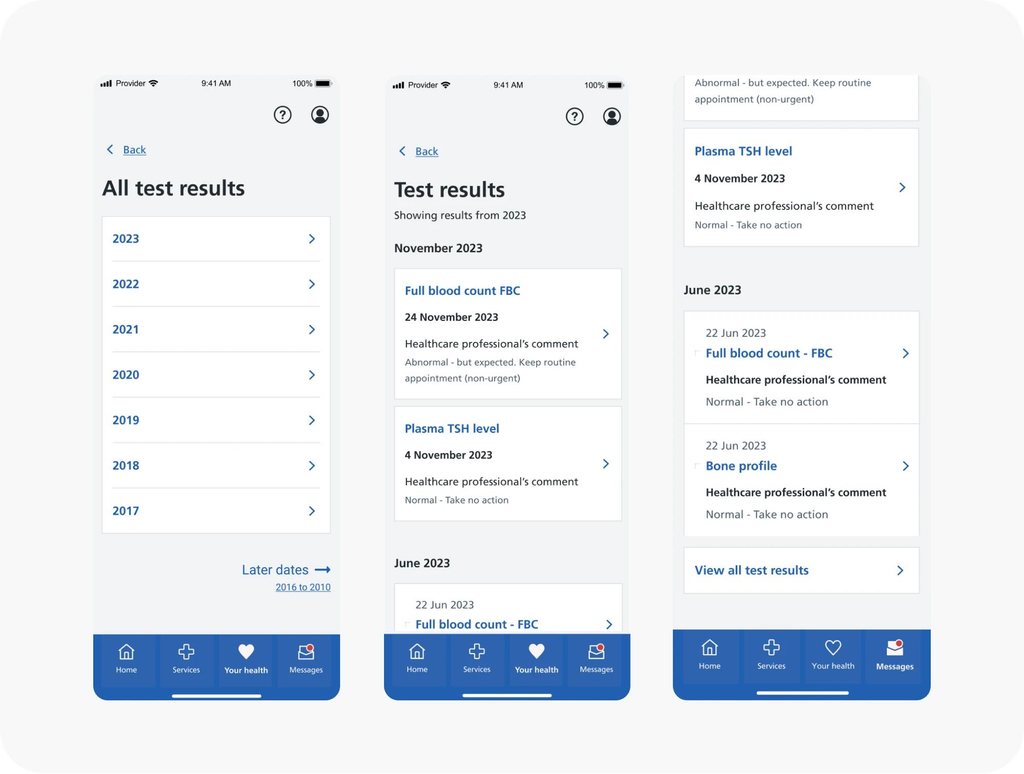
Select the section you want to view.
For example, if you recently had a blood test, open the test results section to check whether your results have been shared with your GP surgery.
If you want to understand your previous medication, check the medicines or prescriptions section.
You can also review appointment notes to remind yourself what was discussed during a previous consultation.
Remember that the NHS App only displays information made available through the connected healthcare systems. It is not necessarily a complete copy of every medical document held about you.
What Medical Information Can You See Through the NHS App?
The NHS App provides access to several types of health information, although availability can vary.
Here is what you may be able to see.
| Medical information | Online availability |
|---|---|
| Current medicines | Available where recorded and shared |
| Previous prescriptions | Depending on the available medicines record |
| Blood test results | Available when shared with your GP record |
| Allergies | Depending on GP record access |
| Medical conditions | Depending on GP record access |
| GP appointment notes | Available where published |
| Vaccination information | Depending on the record system |
| Hospital letters | Where uploaded or shared |
| X-ray and MRI images | Not routinely available through the NHS App |
| Complete historical medical records | May require a separate request |
1. GP Consultation Notes
You may be able to view notes from previous appointments with your GP or another clinician working within your practice.
These notes can include symptoms discussed, clinical observations, treatment recommendations and follow-up arrangements.
Reviewing them can help you remember important instructions after an appointment.
2. Blood Test Results
Some blood test results and other investigations can be viewed online.
For example, you may see results relating to:
- Full blood count.
- Cholesterol.
- Blood glucose.
- Kidney function.
- Liver function.
- Thyroid function.
The tests available depend on what has been recorded and shared with your GP surgery.
If you have recently undergone testing at a hospital, the results may not appear in your GP record until they have been sent to the practice.
3. Prescription and Medication History
Your medicines record can help you review prescriptions issued by your GP.
This may include information about current and previous medicines, depending on the available records.
If you are unsure whether to continue or stop a medication, contact your GP or pharmacist rather than making changes based solely on the information displayed online.
4. Allergies and Medical Conditions
Some patients can view their recorded allergies, adverse reactions and medical conditions.
This information can be useful when attending appointments or discussing treatment with another healthcare professional.
However, always tell healthcare professionals about important allergies or medical conditions, even if they are already recorded electronically.
How to Access Older or Historical NHS Medical Records
One common problem is discovering that the NHS App only displays recent information.
For example, you might want to see a diagnosis made several years ago, an older blood test or a previous treatment plan.
This does not necessarily mean the information has been lost.
Your GP practice may hold historical information that has not been enabled for online viewing.
You can contact your GP surgery and request access to older records.
Explain exactly what you want to see.
For example:
- Your medical history from the previous five years.
- Blood test results from a particular year.
- Previous diagnoses and consultation notes.
- Medication history.
- Records relating to a specific health condition.
You can ask whether the practice can enable historical access through the NHS App or provide a secure electronic copy.
Some older records may be held in different systems or archived formats, so availability can vary.
Important: NHS guidance confirms that older test results, including results from before 2023, may not automatically appear in the online GP record. You can ask your practice to make eligible historical results available. NHS+1
How to Request Your Full NHS Medical Records

If you cannot find the information you need online, you can make a formal request for your personal health information.
This is commonly known as a Subject Access Request (SAR).
Under UK data protection law, you generally have the right to request a copy of the personal information an organisation holds about you.
You do not usually need to explain why you want your records.
Step 1: Identify Who Holds Your Records
The organisation that provided your healthcare will usually hold the relevant information.
For example:
- Contact your GP surgery for GP records.
- Contact the hospital trust for hospital records.
- Contact your dental practice for dental records.
- Contact the relevant community or mental health service for specialist records.
If you have received treatment at several hospitals, you may need to contact each organisation separately.
Step 2: Find the Subject Access Request Contact
Visit the organisation’s official website.
Look for sections such as:
- Medical records.
- Patient information.
- Data protection.
- Subject Access Request.
- Freedom of Information and data protection.
Be aware that Freedom of Information requests and Subject Access Requests are different processes.
A Subject Access Request is the appropriate route for requesting your own personal medical information.
Step 3: Submit Your Request
Most organisations accept requests by email, letter or an online form.
You should provide enough information to help them identify your records.
Include:
- Your full name.
- Date of birth.
- Current contact details.
- Previous names, if relevant.
- NHS number, if available.
- The type of records requested.
- Relevant dates or treatment periods.
- The name of the hospital or GP practice.
You may also be asked to provide proof of identity.
Step 4: Specify the Format You Prefer
You can ask for your records in an accessible format.
For example:
- A secure PDF document.
- Electronic copies.
- Printed copies.
- A specific selection of medical documents.
If you have accessibility requirements, explain them when submitting your request.
Step 5: Wait for the Response
Organisations normally have one calendar month to respond to a valid Subject Access Request.
However, complex or numerous requests may take longer. An extension of up to two additional months may be permitted under data protection rules, with an explanation provided.
Requests are generally free, although certain exceptional circumstances can allow an organisation to charge a reasonable fee.
Read the NHS England Subject Access Request guidance. NHS England Digital+1
How to Access NHS Hospital Records Online
Many people assume their GP record contains everything about their hospital treatment.
Unfortunately, this is not always the case.
Hospital records may include additional information that is not automatically transferred to your GP’s system.
These records can include:
- Outpatient clinic letters.
- Hospital discharge summaries.
- Surgical reports.
- Specialist consultation notes.
- Imaging reports.
- Diagnostic investigation results.
- Inpatient treatment information.
Some hospital information may be shared with your GP or made available through the NHS App.
However, if you need a complete hospital record, you should contact the hospital trust directly.
How to Request Hospital Records
- Identify the NHS hospital where you received treatment.
- Visit its official website.
- Search for the medical records or Subject Access Request department.
- Complete its request form or send an email.
- Explain which records you need and the relevant treatment dates.
- Provide identity documents if requested.
- Ask for a secure electronic copy if you prefer digital access.
If you have attended different hospitals, remember that each hospital trust may hold separate information.
You can also read the official NHS guidance on obtaining copies of medical records. NHS England
Can You Access NHS Medical Records Online in Scotland, Wales and Northern Ireland?
Yes, but the digital services differ across the four UK nations.
The NHS App is primarily the main patient-facing service for England. Other nations have their own systems and arrangements.
England
In England, eligible patients can use the NHS App or NHS website to access available GP health information.
Features include:
- GP records.
- Prescriptions.
- Test results.
- Appointment notes.
- Other shared health information.
Historical records may require additional permission from your GP surgery.
Scotland
Scotland provides MyCare.scot.
The service allows users with a verified ScotAccount to access selected health and social care information online.
Available information includes:
- Medicines and allergy information.
- Some vaccination records from 2021 onwards.
- Certain personal details held by NHS Scotland.
- Health and care service information.
MyCare.scot is being developed to provide additional features, so it should not be treated as a complete online copy of all GP and hospital records.
For other records, contact the relevant GP practice or NHS health board. NHS inform+1
Wales

In Wales, patients can use the NHS Wales App.
Depending on their GP practice’s settings, users may be able to access a summary care record containing:
- Medicines.
- Allergies.
- Selected GP health information.
Patients can also ask their GP practice for access to a more detailed coded record.
This may include test results, diagnoses, consultations, medicines and immunisation information.
The level of access depends on the practice and the information it makes available. NHS Wales App+1
Northern Ireland
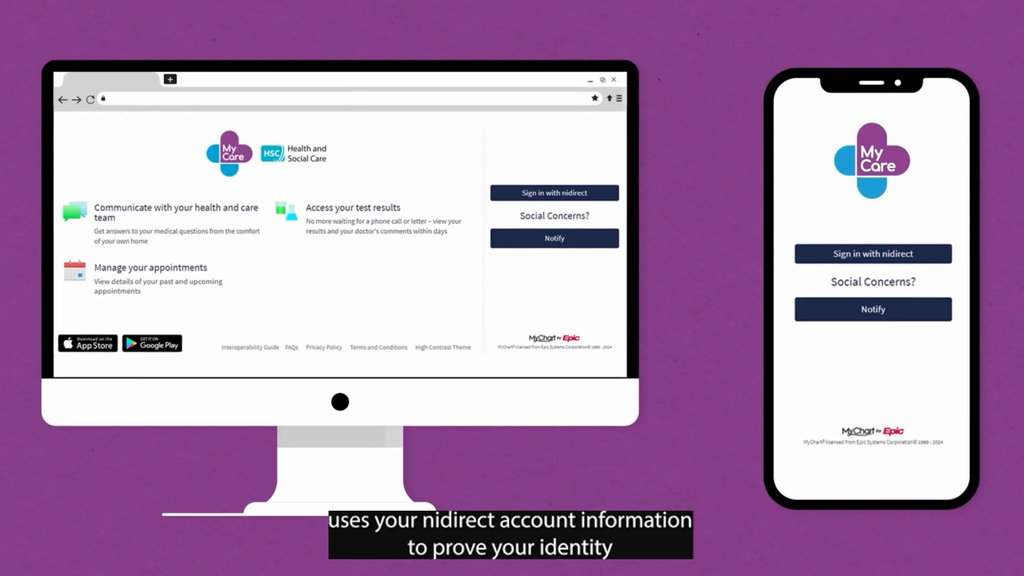
Northern Ireland provides the My Care patient portal.
You can sign in using a nidirect account.
The service provides access to selected information, including:
- Medication details.
- Appointments.
- Some test results.
- Certain hospital information.
My Care does not automatically include GP records or all historical medical information.
For GP records, you may need to contact your GP surgery separately.
The availability of hospital information depends on the records held in the relevant digital system. DHCNI+2
Can You Access Someone Else’s NHS Medical Records?
You cannot automatically access another person’s medical records simply because they are a family member, spouse or carer.
Medical records are confidential, and healthcare organisations must protect personal information.
However, there are circumstances in which another person may be authorised to access records.
1. Accessing a Child’s Medical Records
Parents and guardians may be able to access a child’s health information, depending on the child’s age, understanding and circumstances.
As children become more capable of making their own healthcare decisions, their confidentiality rights must be considered.
Access is not necessarily automatic.
2. Accessing a Partner’s or Relative’s Records
You may be able to access another adult’s records if they give appropriate permission.
The healthcare organisation may require formal authorisation or proof of identity.
3. Accessing Records Through Legal Authority
A person with appropriate legal authority may be able to request records on behalf of someone who cannot manage their own affairs.
The organisation will need to check the relevant legal documentation and whether it covers access to health information.
4. Proxy Access Through the NHS App
In England, eligible individuals may arrange proxy access through their GP practice.
This can allow someone to manage selected NHS services on behalf of another person.
However, proxy access must be authorised, and the level of access depends on the circumstances.
For safety and confidentiality reasons, never share your NHS login details with another person.
Is It Safe to Access Your NHS Medical Records Online?
Yes. Official NHS digital services use security measures designed to protect confidential patient information.
However, your own online behaviour also plays an important role in protecting your medical information.
Follow these practical precautions:
- Use the official NHS App or recognised NHS websites.
- Create a strong and unique password.
- Never share your login or verification codes.
- Avoid signing in on public or shared computers.
- Log out when using someone else’s device.
- Keep your smartphone and applications updated.
- Use your device’s security features, such as a PIN or biometric authentication.
- Be cautious about emails or text messages asking for your NHS login information.
If you believe somebody has accessed your account without permission, follow the official account security guidance and contact the relevant NHS service.
Can Your GP Restrict Access to Your Medical Records?
In certain circumstances, yes.
Healthcare professionals may restrict access to specific information if making it available could create a serious risk of harm to you or another person.
Safeguarding concerns may also affect access.
For example, a GP practice may need to consider whether someone is being pressured or controlled by another person who could misuse their medical information.
Restrictions should be considered in accordance with relevant legal, clinical and safeguarding requirements.
This does not mean your GP can routinely deny access without a valid reason.
What Should You Do If Your NHS Medical Records Are Missing?
Sometimes patients sign into their NHS account and discover that certain information is missing.
This can happen for several reasons.
1. Your GP Has Not Enabled Historical Access
Your GP surgery may have enabled access only from a particular date.
Contact the practice and ask whether older records can be made available.
2. Your Hospital Has Not Shared the Information
Some hospital results and documents are not automatically transferred into your GP record.
Contact the hospital’s records department if you need information that is not available through your GP.
3. You Recently Changed GP Surgeries
Your previous GP’s records may not immediately appear in your new practice’s online record.
Ask your current GP surgery whether your previous medical history has been transferred and whether it can be made available online.
4. Your Account Is Not Fully Verified
Some NHS account features require identity verification.
Check whether your account has full access and complete any outstanding verification steps.
5. There Is a Technical Problem
Try updating the app and signing in again.
If the problem continues, contact your GP practice about missing medical information or the relevant NHS App support service about an account issue.
The GP practice is generally responsible for the accuracy and availability of the GP information it holds. NHS England Digital+2
What If You Find Incorrect Information in Your NHS Medical Records?
It is important to check your medical information carefully.
If you discover an incorrect date, medication, diagnosis or other detail, contact the organisation responsible for the record.
For GP information, start by contacting your GP surgery.
Explain:
- Which entry appears incorrect.
- Why you believe it is inaccurate.
- What information you believe should be recorded.
- Whether you have supporting evidence.
The healthcare professional or records team can review the issue.
It is important to understand that a clinical opinion or historical diagnosis will not necessarily be removed simply because you disagree with it.
For example, a diagnosis that was later reconsidered may still be relevant to understanding previous clinical decisions.
The organisation may correct inaccurate information or add a note explaining your concerns.
You can also exercise your right to request rectification of inaccurate personal information under data protection law.
Why Should You Check Your NHS Medical Records Regularly?
Regularly reviewing your health information can help you become more involved in your healthcare.
Here are some important benefits.
Better Understanding of Your Health
Reviewing your records helps you understand previous diagnoses, investigations and treatment recommendations.
You may also notice information that you want to discuss with your GP.
Improved Medication Awareness
Your online medicines record can help you keep track of prescriptions.
This is particularly useful if you take several medicines or have recently changed treatment.
Easier GP Appointments
Checking previous appointment notes can help you remember what was discussed and prepare questions for your next consultation.
For further guidance on accessing primary healthcare services, read our guide on how to register with a GP in the UK.
Better Preparation for Health Checks
Reviewing your previous test results and health information may help you prepare for routine health assessments.
You can also read our article on NHS Health Checks at 40 to understand what these assessments involve.
Supporting Ongoing Health Conditions
People living with long-term conditions may benefit from reviewing their previous consultations, medicines and investigations.
For additional information, explore our guide to living with Crohn’s disease.
However, do not use an online record as a substitute for medical advice or recommended follow-up appointments.
What Is the Difference Between an NHS Medical Record and a Summary Care Record?
These terms are sometimes confused, but they do not necessarily refer to the same information.
A medical record contains information about your healthcare history.
A summary care record is a more limited summary of important information used to support safe care.
Depending on the system, a summary may contain:
- Current medications.
- Allergies.
- Important medical information.
- Other relevant details.
A detailed GP record can contain considerably more information, including consultation notes, investigations and diagnoses.
The exact information available depends on the healthcare system and the access granted to you.
Frequently Asked Questions About Accessing NHS Medical Records Online
1. Can I access my NHS medical records online for free?
Yes. Accessing available information through official NHS digital services is generally free. You can also normally request a copy of your personal medical information through a Subject Access Request without paying a fee.
2. Can I see my complete medical history on the NHS App?
Not necessarily. The NHS App provides access to information made available through your GP record and connected services. Older records, certain hospital documents and other historical information may require a separate request.
3. How do I access my NHS medical records without the NHS App?
You can contact your GP surgery or hospital directly and request a copy of your records. You may be able to make the request by email, letter or an online Subject Access Request form.
4. Can I download my NHS medical records?
You may be able to view or download certain documents and information through online services. If you need a complete copy, ask the organisation holding your records whether it can provide them electronically in a secure format.
5. How long does it take to receive NHS medical records?
A valid Subject Access Request normally receives a response within one calendar month. Complex requests may take up to two additional months if the organisation explains the extension within the original response period.
6. Can I see my hospital test results on the NHS App?
Some hospital test results may appear if they have been shared with your GP record or made available through a connected service. Results that have not been sent to your GP may need to be requested directly from the hospital.
7. Can I access my NHS records if I live outside England?
Yes, but the digital service depends on where you receive NHS healthcare. Scotland, Wales and Northern Ireland have different digital services and access arrangements.
8. Can my GP refuse to show me my medical records?
Access may be restricted in specific circumstances, such as where disclosure could cause serious harm to you or another person, or reveal protected third-party information. You can ask your GP practice to explain any restriction.
9. Can I access my deceased relative’s NHS medical records?
There are specific legal rules governing access to deceased patients’ records. Eligibility depends on the circumstances, including whether you are the personal representative or have another qualifying legal basis. Contact the organisation holding the records for guidance.
10. What should I do if my NHS medical records contain incorrect information?
Contact the GP practice, hospital or healthcare organisation responsible for the information. Explain which details are inaccurate and request a review or correction. You can also request rectification under applicable data protection law.
Conclusion
Accessing your medical information is an important part of taking control of your healthcare.
For patients in England, the NHS App provides a convenient way to review GP records, medicines, test results and appointment information. However, it does not necessarily contain every historical record or document held by hospitals and other healthcare organisations.
If you cannot find the information you need, contact your GP surgery or the hospital responsible for your treatment. You can also submit a Subject Access Request to obtain copies of your personal health information.
Understanding how to access NHS medical records online can help you prepare for appointments, keep track of your treatment and become more informed about your health.
Most importantly, remember that your medical records are confidential, and you have rights over how your personal health information is accessed and protected.